Home / PDF Tools / PDF Form Filler

Secure PDF Form Filler

Fill, save, and submit complex PDF forms directly in your browser. Our AI-powered field detection automatically identifies text fields, checkboxes, date selectors, and signature blocks — even in scanned documents.

256-Bit AES Encryption
HIPAA Compliant
Auto-Save Every 30s
99.2% OCR Accuracy
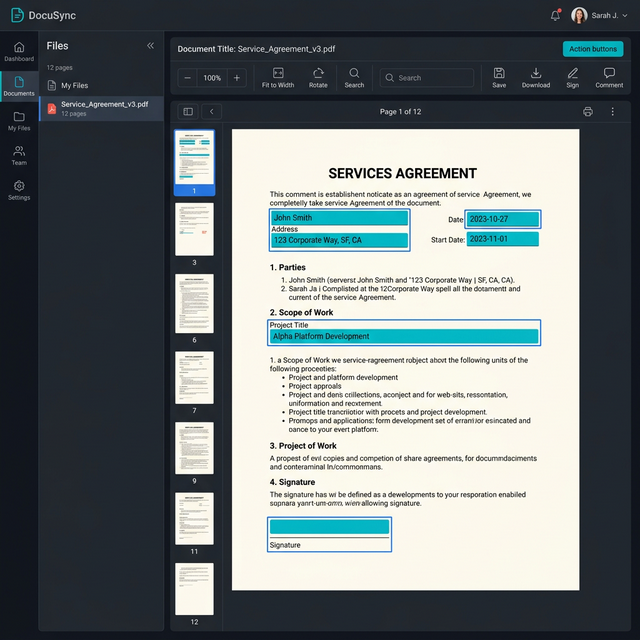
Pacific West Life PDF Form Filler — AI Field Detection Interface

Enterprise-Grade Encryption Specifications

Every document processed through the PDF Form Filler is protected by the same security standards used by major financial institutions.

256-Bit AES Encryption

All documents are encrypted at rest using AES-256, the same standard used by the U.S. Department of Defense. Your data remains unreadable even in the unlikely event of a storage breach.

TLS 1.3 in Transit

Every file upload and download is transmitted over TLS 1.3 with forward secrecy. Man-in-the-middle attacks are mathematically impossible with our certificate pinning.

Zero Document Retention

Processed files are permanently purged from all servers within 60 minutes. No backups, no logs, no traces. Verified by annual SOC 2 Type II audits.

SOC 2 Type IIAudited annually by Deloitte
HIPAA ReadyBAA available for Enterprise
GDPR & CCPAFull data subject rights
ESIGN & UETALegally binding signatures

PDF Form Filler — Frequently Asked Questions

Our proprietary AI model scans the uploaded PDF document and identifies interactive form elements including text fields, checkboxes, radio buttons, dropdown menus, date pickers, and signature blocks. The system uses a combination of structural PDF analysis and machine-learning-based optical character recognition (OCR) to detect fields even in flattened or scanned documents. Detection accuracy is currently rated at 99.2% based on our internal benchmark of 50,000+ form templates across insurance, legal, tax, and healthcare industries.
Yes. The Pacific West PDF Form Filler auto-saves your progress every 30 seconds to your encrypted session. Professional and Enterprise users can save forms to their secure cloud workspace for up to 30 days. Free-tier users can download partially completed forms as PDFs and re-upload them to continue later. All saved data is encrypted with your session-specific AES-256 key, which is destroyed upon session expiry.
The Pacific West Life platform is fully HIPAA-ready. Enterprise customers can execute a Business Associate Agreement (BAA) with Pacific West Life Inc. to ensure compliance when processing Protected Health Information (PHI). Our infrastructure runs on SOC 2 Type II certified data centers with 256-bit encryption at rest, TLS 1.3 in transit, and a strict zero-retention policy — meaning no document data persists on our servers beyond the 60-minute processing window.
The Form Filler accepts standard PDF files (.pdf) including PDF/A-1, PDF/A-2, and PDF/A-3 archival formats. It also processes scanned PDF documents through our built-in OCR engine. For form output, you can export filled documents as PDF, PDF/A (for long-term archival), or flattened PDF (which permanently embeds form data into the document for tamper-proof distribution). Maximum file size is 25 MB on the Free tier, 200 MB on Professional, and unlimited on Enterprise.
Enterprise plan users can assign form-filling tasks to specific team members using our workflow routing feature. Each team member fills their assigned sections, and the system merges all inputs into the final document. Audit trails track who filled which fields, when, and from which IP address. This is particularly valuable for multi-department compliance forms, joint insurance applications, and legal intake documents requiring multiple signers.

Complete Your Document Workflow

eSign Documents

Add legally binding electronic signatures to your filled forms. Compliant with ESIGN Act and UETA for all 50 U.S. states.

Merge PDFs

Combine your filled forms with supporting documents into a single submission-ready PDF package.

Encrypt & Protect

Lock your completed forms with 256-bit encryption and set permissions to prevent unauthorized editing or printing.